- On the Scorecard+ menu, tap Analysis.
- Choose a player. The number beside each name is how many finished rounds they have.
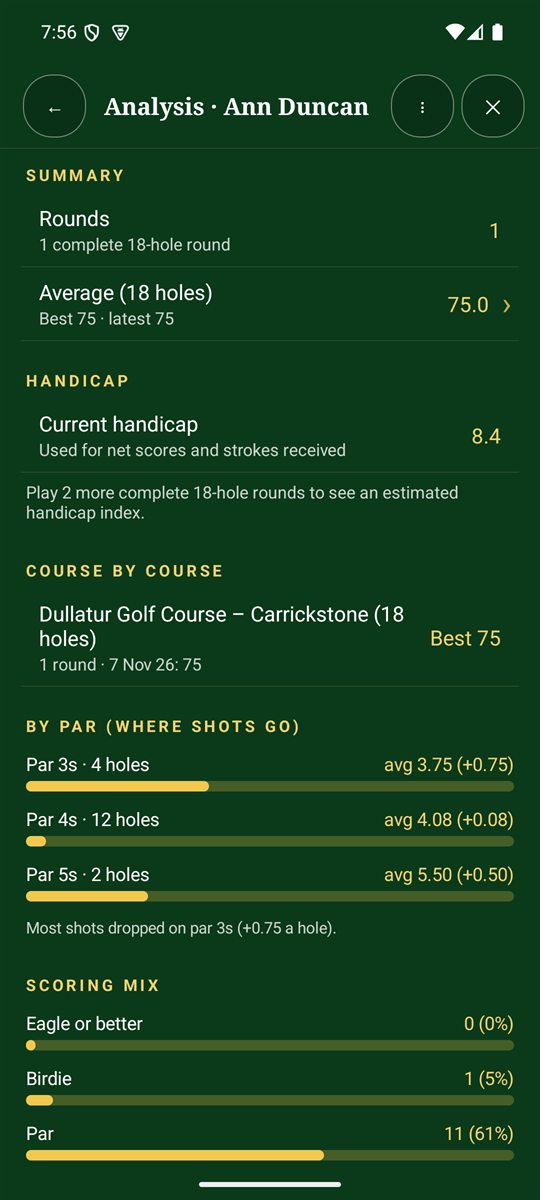
- Scroll through their summary, handicap, course-by-course results, how they score on par 3s, 4s and 5s, and their scoring mix.
Analysis fills in as you finish rounds. The more rounds, and the more detail you record (putts, shot notes and GPS shots), the more it can tell you. For example: "Most shots dropped on par 3s".
What you'll see
- Score against par and average (18 holes) over your recent rounds.
- Putts per hole, if you record putts.
- By par: how you score on par 3s, 4s and 5s.
- Where shots finished and dropped shots, if you add shot notes.
- Club distances and strokes gained, worked out from shots marked with GPS.
- Tips from your recent golf: plain-English pointers on where shots are going.
Estimated handicap index
After three complete 18-hole rounds, Analysis shows an estimated handicap index, worked out the World Handicap System way: the best 8 of your last 20 rounds, using the tee's course rating and slope where the club's card has them. Tap Use to make it the player's handicap.
Please note: this is an estimate for friendly games. It isn't an official handicap. Your club or national association keeps that.