What you need
- An Android phone running Android 8.0 or newer.
- Location turned on if you want course finding and GPS distances.
- Mobile data or Wi-Fi to download courses. Scoring itself works without signal.
Install the app
Golf Score & More is coming soon to Google Play. When it's available, search for Golf Score & More in the Play Store and tap Install.
Set up before your first round
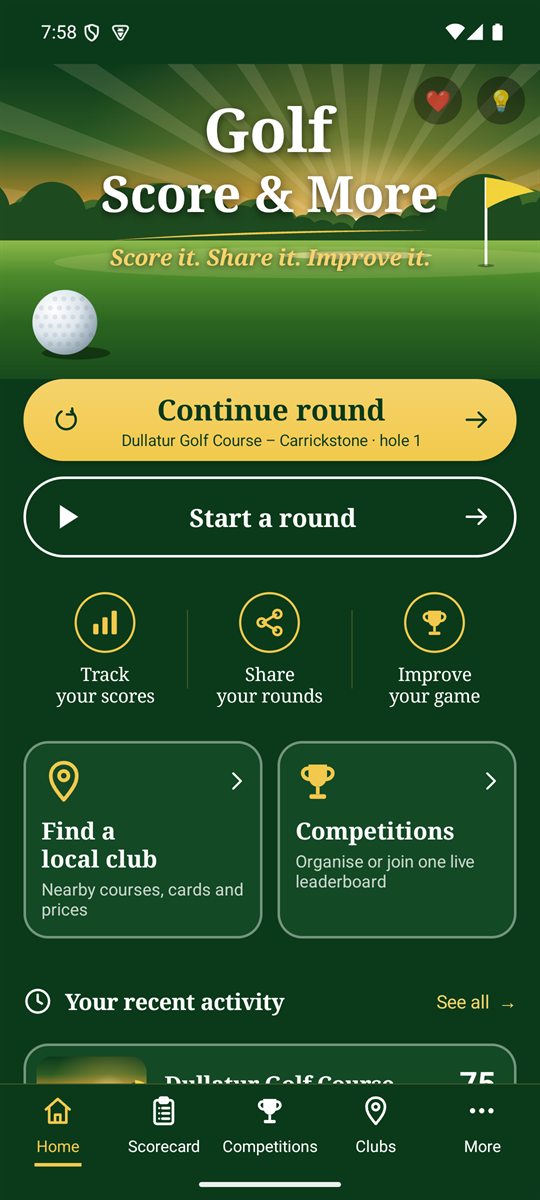
- Open the app. The Home screen has everything you need to start. Take a tour.
- Tap Find a local club (or Clubs in the bottom bar). Allow location when asked, then pick your course to save it and download its holes. More about courses.
- In Scorecard › Players, add yourself with your handicap index, plus the people you usually play with. They're remembered for next time. More about players.
- Have a look at Options to set text size, units, sounds, what to record and whether to use cloud backup. More about options.
- When you're on the first tee, tap Start a round. More about starting a round.
Permissions
The app only asks for a permission when you use the feature that needs it. If you say no, everything else still works.
- Location: courses near you, Follow me and live distances.
- Camera: photographing a paper scorecard or a player's picture, and scanning QR codes.
- Nearby devices: the live group card, which links phones over Bluetooth and Wi-Fi.
- Microphone: voice control, if you choose to use it.
Tip: scores are saved on your phone as you enter them, so it's safe to close the app mid-round. Continue round on the Home screen takes you straight back to the hole you were on.