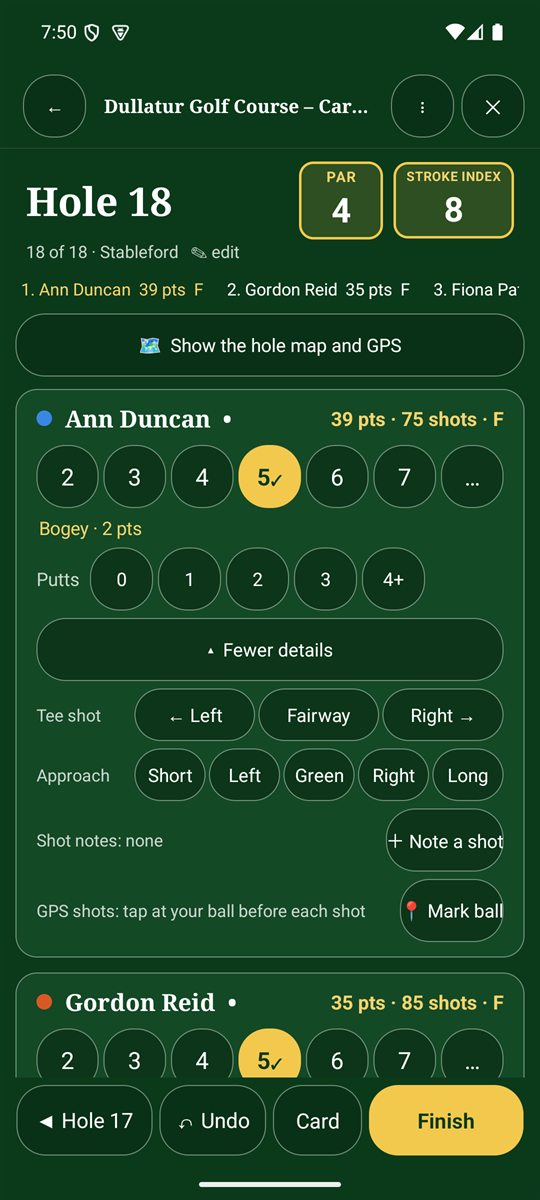
Shot details are optional. They feed the putting, accuracy, club and strokes-gained statistics in Analysis.
- Putts: tap 0, 1, 2, 3 or 4+ under the player's score (shown when Record putts is on).
- Tap + Tee shot, approach, notes to open more details.
- Tee shot (par 4s and 5s): tap ← Left, Fairway or Right →.
- Approach: mark where it finished: Short, Left, Green, Right or Long.
- Tap + Note a shot to record a dropped shot: water, out of bounds or unplayable.
- GPS shots: tap 📍 Mark ball at your ball before each shot. The app measures how far each club goes.
Club suggestions
Once you've marked some GPS shots, the app can suggest which of your clubs usually goes the distance to the middle of the green. Turn on Club suggestion in Options.
Make it automatic
In Options you can choose Shot details open on each hole, so the panel is always ready. Tap ▴ Fewer details to tuck it away again.