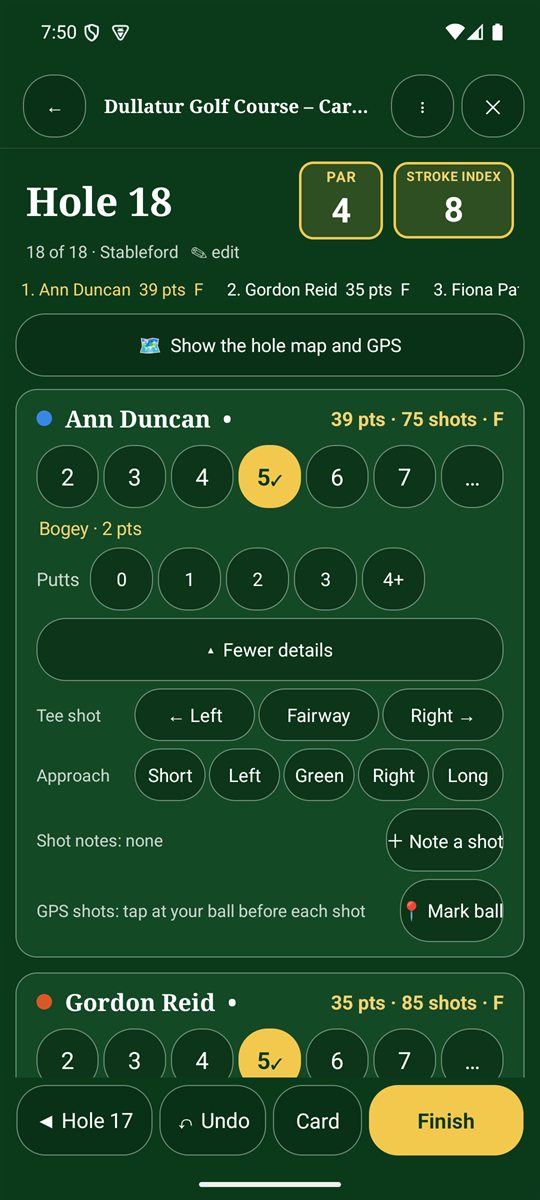
- The top of the hole page shows the hole number, its par and stroke index.
- For each player, tap their score. The chosen number turns gold with a tick and the result (par, bogey and so on) appears underneath.
- If you record putts, tap the number of putts: 0, 1, 2, 3 or 4+.
- The running total beside each name shows their points or strokes and how many holes have been played. The current standings run along the top.
- Tap Hole 3 ► (the next hole) to move on, or ◄ to go back.
Higher scores: tap … to enter a score above 9. Tap a selected number again to clear it.
Other buttons on the hole page
- 🏆 Leaderboard: the standings for your group or competition.
- Show the hole map and GPS: distances and the hole layout. See Hole map, GPS and distances.
- + Tee shot, approach, notes: optional shot details. See Tee shots, putts and notes.
- Card: the full scorecard. See The full scorecard.
- ✎ edit beside the hole details: change the hole's par or stroke index if the course data is wrong.
Made a mistake?
Tap ↶ Undo at the bottom to undo the last score you entered.
Finishing the round
On the last hole, tap Finish, then confirm. You'll see who won, a medal stand, the full card and a result you can share. The round is saved in Round history.